
Trying to attach a camera to a spotting scope often leads to frustrations with a cheap or poorly designed adapter. The best digiscope adapter prevents slipping and misalignment, keeping your shots steady and in focus without constant readjustment.
A common problem with low-quality adapters is a loose fit that causes shaking or sudden drops, ruining a photo or video moment.
The crucial factors for a good digiscope adapter involve precise fit, sturdy materials, and ease of adjustment. Most reliable adapters use metal components, like aluminum alloy, to provide durability without excessive weight. The adapter must match your spotting scope’s eyepiece diameter exactly, usually ranging from 20 to 50 millimeters, with secure locking mechanisms to hold the camera in place.
Smooth focus adjustments and the ability to clean the adapter easily are also important, especially after dusty outdoor use.
Need a Quick Check?
| Image | Product | Price |
|---|---|---|
Our Top Picks 1  | tridaptor Universal Adapter | Check Price |
Our Top Picks 2  | Magsafe Digiscoping Adapter | Check Price |
Our Top Picks 3 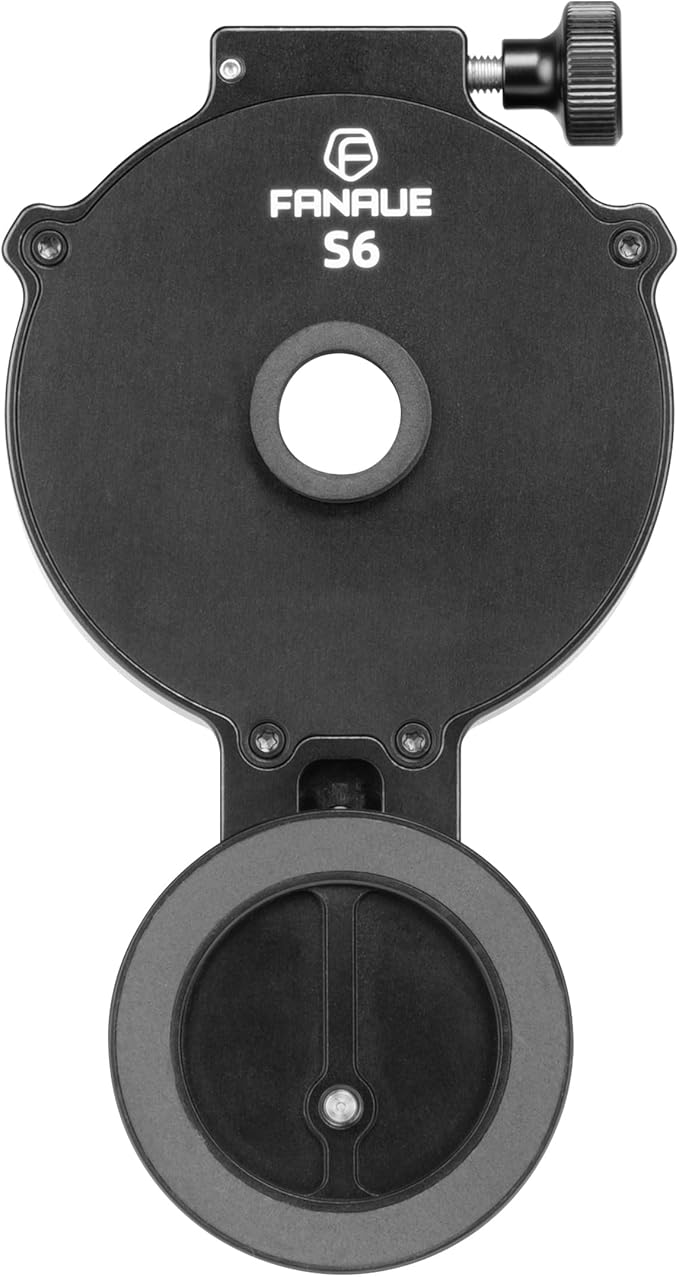 | FANAUE Telescope Adapter | Check Price |
Our Selected Top 15 Digiscope Adapter Worth Buying
This list includes a variety of digiscope adapters designed for different devices and needs. Each review explains how well the adapter works, what type of user it is best for, and the main advantages and drawbacks to help make an informed choice.
1. Tridaptor Universal Digiscoping Phone Adapter
Capturing images through a spotting scope or telescope can be tricky without a stable setup. For someone who wants precise alignment between their phone camera and eyepiece, the tridaptor Universal Digiscoping Phone Adapter provides a solid solution. Its key strength lies in the 3-axis adjustment that ensures sharp and vignette-free shots.
Setting up involves clamping your phone securely between 2.36 and 3.44 wide, then mounting the adapter on an eyepiece that measures between 0.86 and 2.4 outer diameter. Adjust left/right, up/down, and forward/back to find the sweet spot. Rubber pads protect both your phone and eyepiece, and the metal build means it doesn’t slump or shift during use.
Fine manual focus on your scope pairs well with the precise alignment this adapter allows.
It holds the phone steadily and lines up well with your scope’s camera thanks to the all-metal construction and fine-tuning knobs. Clear photos come from its ability to reduce dark edges or vignetting.
Reports show it grips eyepieces firmly without slipping. The most frequent downside is needing to measure your eyepiece carefully before buying, it won’t fit models outside its size range.
Strongest praise highlights its precise 3-axis fine-tuning that delivers clearer images without dark edges. The main complaint revolves around size compatibility, as ordering without checking eyepiece diameter causes fit problems. The build quality and alignment features usually outweigh this issue for many buyers.
People owning spotting scopes or telescopes within the specified eyepiece range will benefit most from this adapter. Users with devices outside the size limits or needing autofocus should consider alternative adapters. Those who value sturdiness and adjustability over quick setup will find this a dependable choice.
Pros
- Rigid aluminum build prevents phone sagging
- 3-axis adjustment allows precise camera alignment
- Fits a wide range of phone sizes
- Rubber pads protect phone and eyepiece from scratches
Cons
- Must confirm eyepiece diameter carefully before purchase
- Manual focus requires steady hand for best shots
| Specification | Details |
|---|---|
| Compatibility (Phone Width) | 2.36″–3.44″ / 60–87.5 mm |
| Compatible Eyepiece Diameter | 0.86″–2.4″ / 22-61 mm |
| Material | Aluminum (all-metal build) |
| Adjustment Axes | 3-Axis: left/right, up/down, forward/back |
| Zoom Ratio | 60x (through scope system) |
| Mount Type | Altazimuth-like mount |
2. Magsafe Digiscoping Phone Adapter
Magnetic snap-on alignment for iPhones makes this digiscoping adapter stand out. It fits a wide range of eyepieces and is built to last outdoors. People who need steady shots during birdwatching, hiking, or astronomy appreciate its solid construction and fast setup.
Attaching the adapter requires no tools, making it easy to switch between scopes or microscopes quickly. Its all-metal build gives confidence while moving around or adjusting your phone.
The lightweight design folds into a backpack without adding bulk. Expect some minor setup guidance, as the support team offers help with fit and replacements if needed.
The adapter holds an iPhone firmly with strong magnets, preventing sag or misalignment during long hikes or night sessions. Aviation-grade aluminum and stainless steel resist scratches and moisture, which suits outdoor use well.
Some users find it doesn’t fit the iPhone Pro Max series or interfere with wireless charging, making compatibility limited but precise for certain phone models.
This phone adapter is praised for its reliable magnetic hold that keeps the iPhone steady during outdoor use. The anodized metal finish holds up well against wear. The most common complaint concerns its incompatibility with larger iPhone Pro Max models and wireless charging limitations, restricting use for some devices.
Birdwatchers, astrophotographers, or field researchers with supported iPhones will find this adapter practical and sturdy. Those who use iPhone Pro Max models or need wireless charging during shots might want to look at alternatives that cover those needs better.
Pros
- Strong magnetic alignment for stable phone attachment
- Fits wide range of eyepiece sizes without tools
- Durable metal build resists scratches and moisture
- Lightweight and compact for easy carry
Cons
- Not compatible with iPhone Pro Max series
- Cannot be used with wireless charging
| Specification | Details |
|---|---|
| Material | Aviation-grade 6061 aluminum and stainless steel |
| Eyepiece Compatibility | 28mm–54mm (about 2.13 inches) |
| Compatibility | iPhone (excluding Pro Max series) |
| Weight | 5.3oz |
| Focus Type | Manual Focus |
| Finderscope | Straight-Through |
3. FANAUE Telescope Phone Adapter
Capturing clear images or videos through a telescope often means juggling phone placement and alignment. The FANAUE Telescope Phone Adapter fits those who use smartphone cameras with different optical devices and want simple, secure mounting. Its strongest feature is the magnetic hold that keeps your phone steady without complicated clamps.
Attaching your phone takes just seconds by placing it in the adapter and aligning the camera over the eyepiece. Adjustable knobs help lock the phone securely. The magnetic system eases quick changes and fine-tuning the viewing angle for clarity.
Measuring the eyepiece before buying ensures a proper fit, especially for microscopes. Carrying it on trips hardly adds any bulk, making it suitable for outdoor use.
It holds the phone firmly for stable shots, essential for zoomed-in or detailed photos. The aluminum alloy frame feels solid and resists rust, promising durability. Some comments mention the magnetic grip can weaken at times, risking slight shifts, but overall alignment stays good during use.
Quick setup and strong materials stand out as main strengths.
Firm magnetic hold and solid aluminum build make it stable and durable for detailed phone photography through various optics. Occasionally, the magnetic grip weakens slightly, leading to minor misalignment which requires readjustment during use.
Those needing a quick and adaptable phone mount for bird watching, stargazing, or microscopy will appreciate the ease and portability. Users with very small or unusual eyepieces might find other dedicated adapters a better match.
Pros
- Fits eyepieces from 30mm to 60mm diameter
- Strong magnets for secure phone attachment
- Adjustable knobs for precise camera alignment
- Lightweight aluminum frame resists rust
Cons
- Magnetism can lessen, causing slight shifts
- Microscope fit requires careful eyepiece measurement
| Specification | Details |
|---|---|
| Compatible Eyepiece Size | 30mm-60mm (1.18 inches-2.36 inches) |
| Compatible Devices | Binoculars, Smartphones, Spotting Scopes, Telescopes |
| Compatible Phone Models | iPhone 11 Pro Max, iPhone 12 Pro Max, iPhone XS Max |
| Mounting Type | Magnetic Mount |
| Material | Aluminum Alloy Frame |
| Water Resistance Level | Water Resistant |
4. Snapshot Spotter Digiscoping Adapter

Magnetic Auto-Centering Technology sets this adapter apart, quickly aligning cameras with spotting scopes like the Nightforce TS-82 and Vortex Viper models. It suits outdoor enthusiasts who want a stable, ready-to-go connection during hunting or birdwatching sessions. The low-profile compression fit keeps it in place without blocking the view.
Setting up involves attaching the adapter to the spotting scope’s eyepiece with a snug compression fit, and pairing it with the Snapcase (sold separately) for magnetic connection. The protective cap on a tether stays attached during rough outdoor use, preventing dirt from entering the scope or adapter.
Keeping everything aligned is straightforward, with no fiddling each time you shoot.
Performance excels in providing a steady hold between camera and scope across zoom ranges from 20x to 60x. Built tough for outdoor environments, the metal parts resist bumps and dirt. Magnetic auto-centering makes framing shots quick, but the Snapcase must be purchased separately, adding cost and complexity.
The cap protects the scope but occasionally feels tight to remove when cold.
Magnetic auto-centering and secure fit help capture precise images quickly during outdoor activities. The main drawback comes from needing to buy the Snapcase separately, which adds extra steps and expenses. The protective cap keeps the adapter clean but can sometimes resist removal, especially in cold conditions.
People wanting quick attachment and steady connection for their Vortex or Nightforce spotting scopes will find this adapter effective. Those who want an all-in-one solution without additional purchases might prefer adapters with integrated mounts. The low-profile design suits fieldwork demanding both viewing and photo compatibility.
Pros
- Instant magnetic alignment prevents missed shots
- Compression fit allows continuous scope viewing
- Protective cap with tether avoids dirt build-up
- Compatible with many popular spotting scopes
Cons
- Requires separate Snapcase for magnetic attachment
- Cap can be difficult to remove in cold weather
| Specification | Details |
|---|---|
| Compatible Devices | Nightforce TS-82, Meopta Meostar S2, Vortex Crossfire & Viper HD models |
| Eye Piece Lens Description | Compression-fit |
| Mount | Altazimuth Mount |
| Focus Type | Manual Focus |
| Zoom Ratio | 20x-60x |
| Additional Features | Magnetic Auto-Centering Technology |
5. Magsafe Digiscoping Phone Adapter for Telescope

People who enjoy astronomy or wildlife observation with smartphones will find the Magsafe Digiscoping Phone Adapter a good fit. Its magnetic attachment is highly secure, making it easy to align your phone camera with various eyepieces. Strong build quality stands out as its biggest strength, promising longevity and stable performance.
Setting up involves attaching the mount magnetically and adjusting it in two directions plus the Z axis for perfect alignment. The magnetic rings hold your phone firmly in place without slipping. It works with most eyepieces between 1.1 and 2.5 diameter, so you don’t need to buy a new adapter every time you switch scopes or phones.
The package also includes a metal ring for older iPhones and Android devices.
Image and video capture through the scope is clear because of the precise manual focus and solid alignment adjustments. The adapter’s aircraft-grade aluminum construction resists scratches and damage better than plastic models.
One common complaint is it does not support MagSafe charging, so you can’t charge your phone while using it. Otherwise, the magnetic connection rarely loosens during use.
The magnetic mount reliably holds phones steady even during movement, a major plus for capturing sharp images of distant objects. Users often mention the convenience of multi-directional adjustments, which help perfectly align the camera lens with the eyepiece. Lack of charging support and the 24-hour wait after attaching the metal ring affect convenience.
Anyone using an iPhone 12 or newer with a MagSafe case will benefit the most from this adapter’s secure hold and easy setup. People with older phones or Android devices can use the included metal ring but should expect the wait before it works properly. Those needing to charge their phone while digiscoping might want to consider an alternative option.
Pros
- Strong magnetic attachment with 20 N52 neodymium magnets
- Adjustable in multiple directions for precise camera alignment
- Fits wide range of eyepiece sizes
- Durable aircraft-grade 6061-T6 aluminum build
Cons
- No support for MagSafe phone charging
- Metal ring requires 24-hour wait before use
| Specification | Details |
|---|---|
| Eye Piece Lens Outer Diameter | 1.1″-2.5″ (28mm-64mm) |
| Mount | Magnetic attachment for telescope eyepieces |
| Focus Type | Manual Focus |
| Compatible Devices | Smartphones, including iPhone 12-17 Pro Max with MagSafe cases |
| Size | 133x90x34mm / 5.24×3.54×1.34″ |
| Weight | 123g / 4.3 ounces |
6. GOSKY Spotting Scope Phone Adapter

Built to fit most smartphones and a wide range of eyepieces between 28mm and 47mm, the GOSKY Spotting Scope Phone Adapter suits anyone wanting to capture images and videos through their spotting scopes or similar optics. Its standout feature is the simple, three-step setup that holds your phone firmly without fuss.
Attaching your phone takes just a moment by placing it in the mount, aligning the camera with the eyepiece, and tightening the knob. The adapter grips phones sized 54 to 90 mm wide, matching popular models across many brands. Day-to-day use involves manual focus through the scope and no need for extra tools or complicated adjustments, which keeps things straightforward in field conditions.
The metal adapter body weighs on durability, made from zinc alloy, while the phone clip uses strong PA plastic. Imaging quality depends on your spotting scope’s eyepiece but aligns well with the Plössl 32mm lens it supports. Positive feedback highlights the solid hold on phones and easy setup; a frequent complaint concerns occasional difficulty in aligning perfectly on the first try.
Firm grip on phones and easy mounting stand out as strong points on the product. It is common for users to spend extra time getting the phone camera precisely aligned with the spotting scope’s eyepiece, which can slow down the start of capturing images.
Those who want quick, reliable attachment for various phone models will find this adapter practical. People who need ultra-fast alignment or handle very heavy phones might consider alternatives with different mounting mechanisms or materials.
Pros
- Fits most phones from 54 to 90 mm width
- Metal body withstands field and weather conditions
- Simple three-step setup secures the phone firmly
- Compatible with eyepieces between 28mm and 47mm
Cons
- Aligning phone camera with eyepiece demands patience
- Clip made of plastic risks wear over heavy use
| Specification | Details |
|---|---|
| Eyepiece Lens Description | Plössl |
| Mount | Altazimuth Mount |
| Focus Type | manual |
| Focal Length | 32 millimeters |
| Zoom Ratio | 28x-90x |
| Compatibility | Smartphones 54-90 mm wide |
7. Celestron NexYZ 3-Axis Phone Adapter

Celestron NexYZ 3-Axis Phone Adapter attaches your smartphone to scopes and microscopes for sharp image capture. It suits anyone needing precise alignment of their phone lens to an eyepiece, especially handy in astronomy, birdwatching, or microscopy. Its strongest feature is the three-directional adjustment that centers the phone camera quickly and accurately.
Setting up involves clamping the adapter onto eyepieces 35 to 60 millimeters wide, including those sized 1.25” and 2”. You place your phone in the holder, which adjusts to grip securely even with a case on. The three adjustment knobs move your phone smoothly along X, Y, and Z axes to line up the camera.
Swapping phones is straightforward thanks to a spring-loaded slider, making transitions quick at outdoor events.
The adapter captures sharp, steady photos and videos through various optical devices because of its precise adjustments. Metal and polymer construction feels solid for outdoor use. The clamp holds tight during activity but might slip on very round eyepieces occasionally.
The setup stiffness offers reliability, while some users note limited water resistance for rough weather.
The three-directional knobs make it easy to center the camera exactly on the eyepiece, resulting in clear, focused images. The metal and polymer build holds up well outdoors but struggles with slipping on some circular eyepieces and offers no protection against moisture or rain.
People wanting steady, precise smartphone shots through scopes or microscopes will find this adapter very effective. Those frequently working in wet or humid outdoors might look for more water-resistant options. Users with a variety of phone sizes and scopes gain particular benefit from the adjustable clamp and versatile fit.
Pros
- Precise three-axis adjustment for camera alignment
- Firm phone grip even with cases
- Fits many phone models and eyepiece sizes
- Durable metal frame with polymer body
Cons
- Can slip on very round eyepieces
- No water resistance for wet conditions
| Specification | Details |
|---|---|
| Compatibility | Telescopes, Binoculars, Spotting Scopes, Monoculars, Microscopes |
| Phone Fit | Wide range including latest iPhone, Samsung Galaxy, Google Pixel |
| Eyepiece Diameter | 35mm to 60mm (Includes 1.25” and 2” eyepieces) |
| Adjustment | 3-axis (X, Y, Z directions) |
| Weight Capacity | 10 ounces |
| Weather Resistance | Not water resistant |
8. Upgraded 360° Telescope Phone Adapter

Attaching your phone to a telescope is smoother than usual with the Upgraded 360° Telescope Phone Adapter. The rotating feature makes changing between horizontal and vertical shots straightforward, suiting both amateur stargazers and wildlife watchers who want clear images without fuss.
Its standout feature is the flexible 360-degree swivel, allowing precise alignment without losing sight quality.
Mounting the adapter feels quick, thanks to its four-step slide and clip design. It clamps firmly to the eyepiece and grips the phone with a strong spring clip, so adjustments don’t come loose while you focus. Switching shooting modes or adjusting phone placement takes seconds, helping you capture moments without delay.
The compact size fits well in outdoor bags, making it handy on hikes or trips.
Images through the eyepiece show a wider field of view than older adapters, with fewer black edges obstructing the screen. The metal frame combined with polymer parts feels solid and reliable, reducing the chance of misalignment during use. The main limitation is that it works best with eyepieces 0.79 to 2 in diameter and phones between 2.6 and 3.7 wide.
The spring clamp is strong but can make thicker phone cases tricky to fit.
Alignment stays steady during use, reducing the need to recalibrate repeatedly. The wide field of view is appreciated for clearer images. However, some find the adapter’s clamp difficult to attach when using bulky phone cases, which limits convenience in those cases.
The adapter suits photographers who want quick setup and flexibility in shooting angles with compatible phones and eyepieces. Those with oversized phones or eyepieces outside the specified range will need a different adapter made for larger dimensions.
Pros
- Quick installation with four simple steps
- Strong spring clamp holds phone firmly
- 360° rotation for easy angle adjustments
- Lightweight and easy to carry outdoors
Cons
- May not fit phones with thick cases easily
- Limited to eyepieces within specific size range
| Specification | Details |
|---|---|
| Rotation Capability | 360° swivel bearing |
| Phone Width Compatibility | 2.6″-3.7″ / 66-95 mm |
| Eyepiece Diameter Range | 0.79″-2″ / 20-50 mm |
| Material | Metal frame and polymer body |
| Weight | 0.22 pounds |
| Size | 4.8*3.1*1.8 inch |
9. Universal Spotting Scope Phone Adapter

Great for anyone wanting to attach their smartphone to a spotting scope, this adapter offers solid build quality and universal compatibility. Its main advantage lies in secure, stable phone mounting that suits a wide range of eyepieces and phone types without needing case removal.
Setting up takes just seconds thanks to the spring-loaded phone grip. You can keep your phone in most cases while attaching it, which saves time in the field.
The six compression rings help fit eyepieces between 39mm and 60.75mm. It stays put during typical outdoor use, letting you capture wildlife photos without fumbling or shaky images.
The adapter performs well at holding phones steady for digiscoping tasks. Its aluminum parts and impact-resistant plastic feel sturdy and built to last.
Reviews praise durability and ease of use, though some note it can slip on eyepieces smaller than 39mm. The tightness and stability on outdoor adventures get frequent positive mentions.
Durability and a secure grip during outdoor activities stand out as major positives. The spring-loaded grip makes attaching and removing phones fast. Slippage on smaller eyepieces is a noted downside, meaning it won’t work well with every scope.
Ideal for serious digiscopers using medium to large eyepieces who want a reliable, well-built mount. Those with smaller or non-standard scopes may want to look for a more specialized adapter better suited to their equipment.
Pros
- Fits phones with cases on or off
- Strong and sturdy materials
- Easily adjustable to many eyepieces
- Quick phone insertion and removal
Cons
- May slip on eyepieces below 39mm diameter
- Heavier than simpler plastic adapters
| Specification | Details |
|---|---|
| Compatible Devices | Smartphones |
| Compatible Phone Models | Universal |
| Eyepiece Diameter Fit | 39mm–60.75mm |
| Minimum Engagement Depth | 22mm |
| Additional Features | Adjustable |
| Water Resistance Level | Waterproof |
10. Phone Adapter for Binoculars

Made with a sturdy clamp and soft silicone padding, the adapter holds smartphones securely on binoculars or spotting scopes. Ideal for photographers and outdoor enthusiasts who want clear digiscoping shots with easy setup and excellent alignment.
Its single biggest strength is the precise optical alignment that prevents dark edges around photos.
Attaching the phone takes only seconds thanks to the simple screw design, with no tools needed. The clamp fits eyepieces between 1.1 and 1.8 inches, covering most binoculars and scopes. Switching between portrait and horizontal orientation is easy using the 360-degree rotation, which helps frame both photos and videos perfectly.
The soft padding avoids scratching the phone while locking it tightly to prevent wobble on the move.
The adapter keeps the phone steady even while tracking moving targets, making images sharp and clear without vignetting. Strong and compact construction suits outdoor use and quick transport.
Some find the clamp slips slightly on very smooth or narrow eyepieces, but generally it stays in place well. The clean alignment knobs make centering the camera straightforward for beginner and experienced users alike.
Clear image alignment receives strong praise for eliminating dark circles and vignetting, resulting in professional-looking shots. The stable locking mechanism performs well in most conditions, though a few users find the clamp less secure on very smooth or smaller eyepieces. Quick installation and rotation make it convenient for spontaneous digiscoping sessions.
People needing a reliable adapter for various phones and optics with good image clarity will appreciate this. Those who frequently use smooth or unusually sized eyepieces might prefer an adapter with a different clamping mechanism. The lightweight build suits users who want to carry their setup easily during outdoor activities.
Pros
- Universal clamp fits most smartphones and optics
- Adjustable knobs ensure precise optical alignment
- 360-degree rotation allows quick orientation changes
- Soft silicone padding prevents phone scratches
Cons
- Clamp may slip on very smooth or narrow eyepieces
- Requires AA batteries, adding slight bulk
| Specification | Details |
|---|---|
| Compatible Devices | Smartphone |
| Eyepiece Diameter Range | 1.1 to 1.8 inches |
| Rotation | 360 Degree |
| Installation | Tool-Free, screw design |
| Focus Type | Center Focus |
| Number of Batteries | AA batteries required |
11. ORLNK Universal Digiscoping Phone Adapter

ORLNK Universal Digiscoping Phone Adapter suits anyone who wants a solid and quick way to attach a phone to scopes for clear photos. Its main strength lies in the easy and fast alignment method, cutting setup time to seconds without losing precision.
It fits a range of devices, making it useful for wildlife watchers, birders, or hobbyist photographers.
Setting it up takes less effort than traditional three-axis adapters. The single-motion Sector Dampening Scan + Forward alignment means you don’t spend minutes tweaking each knob.
The adapter adjusts quickly to different eyepieces and keeps the phone steady, even with thick protective cases on. It fits multiple optical instruments, so switching scopes or monoculars doesn’t require new gear.
The adapter performs well for clear, stable images without wobble or slip. It’s made from CNC machined aluminum, so it resists wear and remains lightweight enough for portable use. The primary praise highlights the fast alignment and sturdy build.
The most common complaint mentions the adapter can feel heavier than some plastic versions despite its comparative lightness.
Most praise comes from how fast and precise the alignment is compared to multiple knob designs. It holds the phone steadily without needing constant readjustment. The common drawback centers on the adapter’s weight, as some find it bulkier than expected for its category.
People who want a strong, reliable mount quick to adjust will appreciate this adapter. It fits well with heavier setups and those needing compatibility with thick phone cases. Those prioritizing ultra-light travel or minimalist gear might look at lighter plastic models instead.
Pros
- Quick single-motion alignment simplifies setup
- Durable CNC aluminum alloy construction
- Works with phone cases up to thick sizes
- Fits various scopes and optical devices
Cons
- Heavier than most plastic adapters
- Not lightweight as some users expect
| Specification | Details |
|---|---|
| Model Name | TP1 |
| Material | Precision aluminum alloy (CNC machined) |
| Compatible Devices | Smartphones with thick cases, binoculars, monoculars, spotting scopes, telescopes, microscopes |
| Alignment Mechanism | Sector Dampening Scan + Forward single-motion |
| Warranty | 2 Year |
12. ZEISS Digiscoping Smartphone Adapter

ZEISS Digiscoping Smartphone Adapter suits anyone who wants quick, secure attachment of their smartphone to a spotting scope for photography or observation. Its biggest strength lies in the magnetic connection and stable clamp, which work together to make swapping phones or adjusting angles smooth and reliable.
Attaching the adapter takes only seconds, and it can be done with one hand, saving time in the field. The adapter fits all phone models and cases without blocking buttons or the camera, so daily adjustments don’t require removing your phone’s case. Rubber inserts keep your device protected, while curved side clamps prevent slipping through movements or wind.
It holds the phone steadily enough to capture clear images through the scope’s eyepiece. Built from stainless steel, anodized aluminum, and high-quality rubber, this item feels solid and durable.
Positive feedback highlights the ease of switching between portrait and horizontal views. A common drawback is its premium price compared to simpler adapters.
Many appreciate how easily the adapter attaches and detaches while maintaining a secure hold. Adjusting to any viewing angle is straightforward, which works well for quick field use. A frequent downside mentioned is the price relative to simpler, less durable options, making it more of a specialized investment.
Those who frequently use digiscoping for detailed photography or observation and want reliable, sturdy equipment will find this adapter suitable. For casual or occasional users on a tighter budget, a lighter and less expensive model might be a better option.
Pros
- Fits all phone models and cases
- Quick, one-handed attachment and removal
- Magnetic connection for easy switching
- Protective rubber inserts prevent phone damage
Cons
- Higher cost than basic adapters
- Some find it bulky for travel
| Specification | Details |
|---|---|
| Item Package Dimensions (L x W x H) | 5.9 x 2.7 x 1.5 inches |
| Package Weight | 6.72 ounces |
| Material | Stainless Steel |
| Included Components | Smartphone Adapter |
| Brand Name | ZEISS |
| Warranty | 2 Year Warranty |
13. APEXEL 360° Universal Digiscoping Phone Adapter

Capturing distant wildlife or moon craters with your phone can be tricky without the right gear. For anyone wanting a lightweight, quick-to-attach adapter for their spotting scope or binoculars, the APEXEL 360° Universal Digiscoping Phone Adapter fits the bill.
Its main strength lies in how light and fast it is to use without bulky parts.
Setup is straightforward thanks to a snap-on clamp that attaches in about 10 seconds. The 360° rotation allows easy switching between horizontal and vertical modes without removing your phone. It fits eyepieces from 23 to 50mm diameter and works with most iPhone and Android phones.
The included quick-start guide helps beginners start shooting quickly. Using the Bluetooth remote prevents camera shake when taking photos or videos.
Performance is solid for clear shots, especially when zooming the phone to 2x to minimize black edges around the view. The build is mostly plastic and very lightweight at 0.22 pounds, making it easy to carry for long outdoor sessions. It holds the phone steady but needs a snug fit on eyepieces close to 23mm or 50mm.
Few users note minor wobbling if the eyepiece diameter isn’t exact.
The adapter’s easy snap-on and rotation features receive strong praise, allowing fast adjustments and portability without the hassle of screws. The common complaint concerns fit; users with eyepieces near the minimum or maximum size experience slight wobbling or looseness, which affects image stability.
Bird watchers and casual digiscopers who want fast, lightweight gear will appreciate this product. Those requiring a tougher, metal-bodied adapter for heavier use or precise stability might want to consider alternatives with a more secure eyepiece clamp design.
Pros
- Lightweight design avoids extra gear fatigue
- Quick snap-on setup in around 10 seconds
- 360° rotation adjusts framing smoothly
- Bluetooth remote reduces photo shake
Cons
- May wobble if eyepiece diameter is off
- Plastic build less durable than metal options
| Specification | Details |
|---|---|
| Compatible Devices | Smartphones |
| Compatible Phone Models | Universal |
| Mounting Type | Assist Grip Mount |
| Eyepiece Diameter Range | 23-50mm (0.9–2.0 inch) |
| Additional Feature | 360° Rotatable |
| Weight | 0.22 lb |
14. Universal Digiscoping Spotting Scope Phone Adapter

Aluminum alloy build offers a durable solution for attaching a smartphone to various spotting scopes. Ideal for people who want a reliable way to capture photos through scopes of different sizes.
Its magnetic protective cover stands out, keeping the lens safe from dust and scratches.
Setup involves fine-tuning the adapter to fit the diameter of your spotting scope. Included adjustment tools and two magnetic phone plates make aligning your smartphone straightforward.
The magnetic phone plates work well but do not support wireless charging, which may affect convenience. Daily use benefits from the dust and scratch-resistant cover that protects the lens when not in use.
The adapter holds the phone steady for clear digiscoping shots. Its aluminum alloy construction feels strong and lasting. Most praise centers on the solid build and adaptability to many scope sizes.
Some users find the magnetic phone plates incompatible with wireless chargers, which requires removal when charging.
Durability and adaptability receive the most compliments, especially the solid aluminum frame and fine-tuning options for many scope sizes. A frequent drawback is the need to remove magnetic phone plates for wireless charging, which interrupts convenience for some users.
The adapter suits smartphone photographers using spotting scopes of varying diameters who value strong protection for lenses. Anyone wanting wireless charging while attached should consider an alternative solution since the included phone plates block wireless charging functions.
Pros
- Durable aluminum alloy construction
- Magnetic protective cover guards lens
- Fits a variety of spotting scope sizes
- Comes with adjustment tools and phone plates
Cons
- Phone plates not compatible with wireless chargers
- May require manual tuning for perfect fit
| Specification | Details |
|---|---|
| Material | Aluminum alloy |
| Compatible Devices | Smartphone |
| Focus Type | Spotting scope adapter |
| Included Items | Adapter, Adjustment tools, 2Pcs Phone Magnetic Stickers Plate |
| Additional Features | Magnetic protective cover |
15. Carson Smartphone Digiscoping Adapter Clip

People who enjoy examining small objects with their smartphone and already own a Carson MicroBrite Plus microscope will find this adapter clip fits their needs well. It works only with Carson MicroBrite Plus models and helps you capture clear microscopic images using your phone.
Attaching the clip to your phone takes just a few moments. It fits most smartphones securely, aligning the built-in camera with the microscope eyepiece.
Day-to-day use involves simply clipping the adapter when you want to snap photos or videos of miniature subjects. It’s practical for students, educators, and hobbyists who want to document small details on the go.
Performance depends largely on the microscope it attaches to. It converts the scope into a digital device by holding the phone steady. Build quality is solid plastic, sturdy enough for regular handling.
The clip is stable but some users mention it can slightly slip if not carefully positioned. The strongest feature is ease of use for both adults and kids in various detailed inspections like stamps or jewelry.
The clip is praised for making it easy to share microscopic views quickly without complicated setup. Stability is generally good but the alignment requires some attention to avoid slipping during use. The adapter is small and practical for frequent use but demands the matching Carson microscope to function.
Anyone with a compatible Carson MicroBrite Plus microscope who wants to capture and share microscopic images on their smartphone will appreciate this clip. People with other microscope brands or those wanting broader compatibility should look elsewhere, as this adapter only fits specific models and smartphones with certain camera positions.
Pros
- Fits most smartphones with built-in camera
- Simple attachment and removal process
- Works well with microscope’s magnification range
- Useful for educational and hobbyist purposes
Cons
- Only compatible with specific MicroBrite Plus models
- Can slip if not carefully aligned on phone camera
| Specification | Details |
|---|---|
| Model Name | MicroBrite Plus Smartphone Adapter Clip |
| Compatibility | Only Carson MicroBrite Plus MM-300 or MM-350 |
| Brand | Carson |
| Unit Count | 1 Count |
| Built-In Media | Smartphone Digiscoping Clip |
| Warranty | One Year Limited Warranty from Manufacturers Defects |
Best Digiscope Adapters Comparison Table
| Product | Compatible Devices | Mount Type | Focus Type | Additional Features |
|---|---|---|---|---|
| tridaptor Universal Adapter | Smartphone | Altazimuth-like Mount | Manual Focus | 3-Axis Design, All-Metal Build |
| Magsafe Digiscoping Adapter | Smartphone | – | Manual Focus | Magsafe compatible |
| FANAUE Telescope Adapter | Binoculars, Smartphones, Spotting Scopes, Telescopes | Magnetic Mount | – | Adjustable, One-Hand Operation |
| Snapshot Spotter Adapter | Nightforce TS-82, Vortex, Meopta | Altazimuth Mount | Manual Focus | Magnetic Auto-Centering Technology |
| Magsafe Telescope Adapter | Smartphone | Magnetic attachment adapter | Manual Focus | Magnetic Attachment |
| GOSKY Spotting Scope Adapter | Camera | Altazimuth Mount | Manual Focus | Adjustable |
| Celestron NexYZ Adapter | Telescopes, Binoculars, Spotting Scopes, Monoculars, Microscopes | Clamp | – | Sharp Image Capture |
| Upgraded 360° Telescope Adapter | – | – | – | – |
| Universal Spotting Scope Adapter | Smartphones | – | – | Adjustable, Waterproof |
| Binoculars Phone Adapter | Smartphone | – | Center Focus | 360 Degree Rotation, Precision Alignment |
| ORLNK Universal Adapter | Spotting Scope, Monocular, Microscope | – | – | Robust, Lighter, Easy Align |
| ZEISS Smartphone Adapter | Smartphone | – | – | Stainless Steel, 2 Year Warranty |
| APEXEL 360° Adapter | Smartphones | Assist Grip Mount | – | Rotatable |
| Universal Digiscoping Adapter | Smartphone | – | Spotting Scope Adapter | Magnetic Protective Cover |
| Carson Digiscoping Clip | Smartphone | Clip | – | Compatible with Carson Microscopes |
- Compatible DevicesSmartphone
- Mount TypeAltazimuth-like Mount
- Focus TypeManual Focus
- Additional Features3-Axis Design, All-Metal Build
- Compatible DevicesSmartphone
- Mount Type–
- Focus TypeManual Focus
- Additional FeaturesMagsafe compatible
- Compatible DevicesBinoculars, Smartphones, Spotting Scopes, Telescopes
- Mount TypeMagnetic Mount
- Focus Type–
- Additional FeaturesAdjustable, One-Hand Operation
- Compatible DevicesNightforce TS-82, Vortex, Meopta
- Mount TypeAltazimuth Mount
- Focus TypeManual Focus
- Additional FeaturesMagnetic Auto-Centering Technology
- Compatible DevicesSmartphone
- Mount TypeMagnetic attachment adapter
- Focus TypeManual Focus
- Additional FeaturesMagnetic Attachment
- Compatible DevicesCamera
- Mount TypeAltazimuth Mount
- Focus TypeManual Focus
- Additional FeaturesAdjustable
- Compatible DevicesTelescopes, Binoculars, Spotting Scopes, Monoculars, Microscopes
- Mount TypeClamp
- Focus Type–
- Additional FeaturesSharp Image Capture
- Compatible Devices–
- Mount Type–
- Focus Type–
- Additional Features–
- Compatible DevicesSmartphones
- Mount Type–
- Focus Type–
- Additional FeaturesAdjustable, Waterproof
- Compatible DevicesSmartphone
- Mount Type–
- Focus TypeCenter Focus
- Additional Features360 Degree Rotation, Precision Alignment
- Compatible DevicesSpotting Scope, Monocular, Microscope
- Mount Type–
- Focus Type–
- Additional FeaturesRobust, Lighter, Easy Align
- Compatible DevicesSmartphone
- Mount Type–
- Focus Type–
- Additional FeaturesStainless Steel, 2 Year Warranty
- Compatible DevicesSmartphones
- Mount TypeAssist Grip Mount
- Focus Type–
- Additional FeaturesRotatable
- Compatible DevicesSmartphone
- Mount Type–
- Focus TypeSpotting Scope Adapter
- Additional FeaturesMagnetic Protective Cover
- Compatible DevicesSmartphone
- Mount TypeClip
- Focus Type–
- Additional FeaturesCompatible with Carson Microscopes
How to Choose the Best Digiscope Adapter
Compatibility with your scope and phone model matters most to avoid fit issues and loose connections. A sturdy build and easy mounting prevent damage during use and save frustration. Choosing the right adapter saves money by avoiding returns and upgrades later.
Compatibility with Devices
Attaching an adapter to a digiscope and a smartphone can be frustrating when the fit isn’t right. Many adapters fail to hold the devices steady, causing the phone to slip or the images to blur during shots. A good adapter accommodates a wide range of eyepiece sizes, typically from 30mm to 50mm in diameter, and grips them firmly without damaging the lens cover or rubber.
The material of the clamps, often sturdy ABS plastic with rubber padding, plays a crucial role in keeping everything stable throughout use.
Adjustability is another key feature that affects photo quality. Adapters with fine-tuned alignment controls allow you to shift the phone holder horizontally and vertically, ensuring the camera lens is perfectly centered on the scope’s eyepiece. This prevents weird vignetting or off-center images that happen with rigid setups.
Look for models with thumb screws or sliding rails for this purpose. Daily use becomes significantly easier when the setup only requires minor tweaks instead of constant repositioning.
Build Quality and Materials
Using an adapter made from low-quality materials often leads to frustration, especially out in the field. Plastic parts can crack under pressure or after a few drops, and metal components that aren’t properly treated might corrode quickly from moisture or sweat.
Frequent adjustments become tricky when the adapter can’t hold its position securely, causing blurry images and snapping shots that miss the mark. A solid build with aluminum alloys or reinforced materials ensures the adapter stays steady and intact, even during rough handling or extended wear.
Weight matters more than expected. Bulky adapters add unnecessary strain during long hikes or spotting sessions, making it harder to keep the setup balanced on the tripod or handheld.
Lightweight constructions around 100 to 200 grams keep everything manageable without sacrificing the rigidity. Some models include coatings or finishes that resist environmental damage like salt spray or dust, letting the adapter hold up well in humid or coastal conditions. This durability means fewer replacements and a smoother experience every time the lens and camera come together.
Ease of Installation and Adjustment
Setting up a connection between your smartphone and a spotting scope on a windy trail or in fading light can be frustrating. A model with a toolfree mounting process makes it easy to attach and detach without fumbling for screws or tools.
This simplicity speeds up the setup, letting you start shooting quickly without missing moments in nature. Look for adapters with spring clamps or quick-release trays that fit eyepieces between 24 and 50 millimeters in diameter, common sizes for many scopes.
The ability to fine-tune alignment without forcing or scratching your equipment matters a lot. Some adapters offer adjustable brackets or sliding rails that let you center the phone lens over the scope eyepiece precisely.
Tight, secure locking mechanisms, often rubberized knobs or ratcheting levers, keep everything steady during photography or video. Without these, even a slight movement can cause a blurry shot or misaligned frame. Good adapters hold firm through normal hand movements and light bumps, giving reliable results outdoors.
Image Stability and Clarity
Capturing a clear image often depends on how well the attachment controls small movements. Even a slight shake can turn a promising shot into an unusable blur. The best options include mechanisms that reduce vibrations and allow for fine tuning of lens alignment.
This means less fiddling with focus after setting up and less frustration in windy or unstable conditions, like standing on uneven ground.
A stable grip plays a crucial role here. Attachments with secure clamps or cushioned supports stop the setup from shifting mid-capture, which is common with heavier lenses. Look for adapters made with materials like aluminum or reinforced plastic for durability without excessive weight.
Some models provide adjustable screws or quick-release levers that help maintain proper alignment and prevent drift. This combination keeps images sharp and focused over extended use, especially during outdoor excursions lasting several hours.
Portability and Storage
Carrying bulky equipment can ruin a day of outdoor photography fast, especially if your camera bag is already tight. A compact adapter that fits neatly into standard camera or outdoor gear bags solves this problem.
Sizes under 7 inches in length and a weight close to 150 grams allow it to slide into a corner of your backpack without adding unnecessary bulk. Having something small and lightweight means it won’t interfere with other essential gear like lenses, tripods, or batteries.
Foldable or detachable elements make a big difference for those who travel frequently or hike to remote locations. Removing an eyepiece or folding out an extending arm can shrink the profile, making it easier to pack and less prone to damage. Look for models with sturdy locking mechanisms so parts don’t loosen during transit.
Protective cases or covers are invaluable. A padded, hard-shell case guards against scratches and minor impacts, and some include compartments for accessories, which helps keep everything organized when you’re not using the adapter.
Proper Setup and Alignment Techniques for Optimal Digiscope Performance
Aligning a digiscope adapter begins with securing the smartphone firmly to the eyepiece. Loose attachment often results in blurry or vignetted images.
Use adjustable clamps or rubber grips provided by most adapters to ensure the phone’s camera lens sits directly over the scope’s eyepiece lens.
Start by setting the digiscope on a stable surface or tripod to avoid movement. Hold your phone steady and center the camera lens over the eyepiece while loosening the adapter clamp. Slowly tighten the clamp, checking for alignment through your phone’s screen.
Minor shifts in position can be corrected here to avoid image distortion.
Additional tips for better results:
- Use the phone’s zoom sparingly; digital zoom can degrade image quality.
- Adjust the digiscope focus before fine-tuning the phone’s camera focus.
- Check for light leaks from gaps between phone and eyepiece, which can reduce contrast.
- Clean lenses and adapter parts regularly to maintain clarity.
Maintenance and Cleaning Tips to Extend Your Digiscope Adapter’s Lifespan
Keep your digiscope adapter free from dust and moisture to maintain clear optical performance. Use a soft microfiber cloth to wipe the lens and connection points gently after every use.
Avoid using harsh cleaning chemicals that can damage lens coatings or plastic parts.
Store the adapter in a padded case or pouch to protect it from scratches and impacts. Avoid leaving it exposed to direct sunlight or extreme temperatures, which may cause material warping or adhesive breakdown.
Check the screws or clamps regularly. Loose fittings can affect stability and alignment between the adapter and your device. A small Phillips screwdriver can help tighten parts without risking damage.
Quick maintenance checklist:
- Wipe lenses with microfiber cloth after use
- Keep storage case clean and cushioned
- Inspect and tighten screws as needed
- Avoid exposure to water and harsh chemicals
- Handle adapter by body, not lens area
Following these simple steps can extend the adapter’s lifespan and preserve image quality for years of reliable use.
Comparing Digiscope Adapters with Smartphone-Specific Mounts: Pros and Cons
Digiscope adapters offer a universal design that fits a variety of spotting scopes and smartphones, which means fewer compatibility concerns if you upgrade your phone or switch between devices. These adapters usually feature adjustable clamps to hold phones of different sizes securely, making setup straightforward for most users.
On the downside, this flexibility can make the adapter bulkier and sometimes less stable, especially with heavier phones or scopes.
Smartphone-specific mounts, on the other hand, tend to be more compact and tailored to fit a particular phone model precisely. This often results in a snugger fit with fewer chances of misalignment, potentially improving image quality by reducing shake during shooting.
However, these mounts lose versatility. Using a different phone model typically means buying a new adapter, which adds cost over time.
Key differences:
- Universal adapters fit multiple devices but can be heavier and less stable.
- Smartphone-specific mounts offer a tighter fit but lack cross-device compatibility.
- Universal options save money if you change phones frequently.
- Specific mounts may deliver better image stability for a single phone model.
People Also Asked
How Do I Attach a Digiscope Adapter to My Phone Properly?
Align the adapter’s eyepiece clamp with your digiscope lens and secure your phone so its camera lens lines up exactly with the adapter’s lens opening. Make small adjustments to avoid vignetting or blurry edges. Tighten the clamps gently to prevent slipping without cracking the plastic.
What Sizes Fit Most Digiscopes and Smartphone Models?
Most adapters fit eyepiece diameters between 30mm and 45mm and phone widths from about 6cm to 8.5cm. Check the specific model descriptions and measure your phone and scope closely before buying. Some adapters have adjustable clamps or silicone inserts to accommodate various sizes.
Are Digiscope Adapters Safe for My Smartphone Camera Lens?
Digiscope adapters usually won’t damage smartphone lenses if they feature soft padding around the clamps and are handled carefully. Avoid over-tightening the grip to prevent pressure marks on the lens or build-up of debris under the adapter. Clean the contact surfaces regularly.
How Do I Clean and Maintain a Digiscope Adapter Correctly?
Keep the adapter clean using a microfiber cloth and mild soap solution if necessary. Remove dust or grit from the clamps and lenses immediately to prevent scratches. Store the adapter in a protective case or pouch away from direct sunlight and moisture to prolong its lifespan.
What Common Problems Should I Expect with Digiscope Adapters?
Common issues include alignment challenges causing dark corners or blurry photos, clamps loosening over time, and adapters that don’t fit securely on oversized or oddly shaped phones. Regularly check for wear in the clamp mechanism and practice mounting before your outing to speed up the setup.
Conclusion
Choosing the right digiscope adapter comes down to a few key points. Make sure it fits your digiscope and camera model securely without wobbling. Check the build quality to avoid frequent adjustments or damage.
Also, consider how easy it is to attach and remove since that affects your setup time in the field.
Think about where you’ll use the adapter most often and how much you’re willing to spend. A less expensive model might be fine for occasional use, but daily use calls for something more durable. Review the comparison table and the detailed picks above to find the option that matches your needs and budget best.